Building an AI Model Governance Framework on Amazon Bedrock and AWS
Every company has a process to approve software before teams can use it internally, whether it's for innovation, experimentation, or production workloads. But the game has changed with AI. With hundreds of open-source models, marketplace offerings, and the ability to fine-tune and import custom weights, developers have more options than ever. That's great for building, but for governance and compliance, organizations need a mechanism to allow only approved models.
Below are some of the ways I've identified to enforce an AI Model Allow List on AWS. These are a good starting point and can be expanded as your organization's AI governance posture matures. The IAM policies included are for reference and are not complete, but they show the key actions and conditions for each path.
1. Bedrock Foundation Models
These are the serverless models like Claude, Titan, Llama, and DeepSeek. You call InvokeModel and get a response. No infrastructure to manage.
The primary control here is IAM or SCP policies. Deny InvokeModel on everything except the models you approve:
{
    "Effect": "Deny",
    "Action": [
        "bedrock:InvokeModel",
        "bedrock:InvokeModelWithResponseStream",
        "bedrock:CreateModelInvocationJob"
    ],
    "NotResource": [
        "arn:aws:bedrock:*::foundation-model/anthropic.claude-3-5-sonnet*",
        "arn:aws:bedrock:*::foundation-model/amazon.titan*"
    ]
}
Replace the ARNs with whatever your organization approves. Use * to allow all versions of a model family. This works at the user, role, or org level.
2. Bedrock Marketplace Models
100+ additional models available in the Bedrock Marketplace. When you deploy one, Bedrock creates a SageMaker endpoint behind the scenes. You never touch SageMaker directly.
The key insight here is that Bedrock automatically tags the SageMaker resources it creates with sagemaker-studio:hub-content-arn. You can use this tag in IAM conditions to control which marketplace models get deployed.
To block a specific model like DeepSeek:
{
    "Effect": "Deny",
    "Action": [
        "sagemaker:CreateEndpoint",
        "sagemaker:CreateEndpointConfig",
        "sagemaker:CreateModel"
    ],
    "Resource": "arn:aws:sagemaker:*:*:*/*",
    "Condition": {
        "StringLike": {
            "aws:ResourceTag/sagemaker-studio:hub-content-arn":
              "arn:aws:sagemaker:*:aws:hub-content/SageMakerPublicHub/Model/deepseek*"
        }
    }
}
The policy targets SageMaker resources because that's where the compute actually runs, even though Bedrock is the one creating them.
3. SageMaker JumpStart
This is the big one. 400+ models, with the ability to deploy and fine-tune on your own data. AWS provides Private Curated Hubs to give you full control over which models your teams can access.
Fixing it takes two steps.
Step 1: Create a Private Curated Hub with only approved models. Admins add models programmatically. Users browse and deploy from this hub.
Step 2: Block the Public Hub. Both steps are needed because the private hub and the public hub are independent. Without this deny, users can still browse the full catalog alongside your curated one. The complete block includes both SageMaker API access and the underlying S3 bucket access:
{
    "Version": "2012-10-17",
    "Statement": [
        {
            "Action": "s3:*",
            "Effect": "Deny",
            "NotResource": [
                "arn:aws:s3:::jumpstart-cache-prod-us-east-1/*.ipynb",
                "arn:aws:s3:::jumpstart-cache-prod-us-east-1/*eula*",
                "arn:aws:s3:::your-bucket/*"
            ]
        },
        {
            "Action": "sagemaker:*",
            "Effect": "Deny",
            "Resource": [
                "arn:aws:sagemaker:us-east-1:aws:hub/SageMakerPublicHub",
                "arn:aws:sagemaker:us-east-1:aws:hub-content/SageMakerPublicHub/*/*"
            ]
        }
    ]
}
Replace us-east-1 with your region and your-bucket with any S3 buckets your private hub needs access to.
The Public Hub ARN has aws as the account ID because it's AWS-owned. Your Private Hub has your account ID. So the deny only hits the public catalog. Note that the S3 deny is broad by design, so test carefully and add any S3 buckets your private hub or workloads need to the NotResource list.
Once the public hub is blocked and a user has access to only one private hub, they land directly in it when they open JumpStart. Clean experience.
You can also block gated model access (where users accept EULAs to bypass the hub) and block registration into Bedrock if you don't want JumpStart models showing up there. For multi-account orgs, AWS RAM lets you share the Private Hub across accounts.
4. Custom Model Import
Your ML team fine-tuned an open-source model on proprietary data. The weights are sitting in S3. They want to use it through Bedrock without managing a SageMaker endpoint.
Custom Model Import lets them upload weights to S3, Bedrock imports and hosts the model, and it's callable via InvokeModel like any other Bedrock model.
If your org doesn't need this capability, block it entirely:
{
    "Effect": "Deny",
    "Action": "bedrock:CreateModelImportJob",
    "Resource": "*"
}
If the model never gets into Bedrock, nobody can invoke it. For teams that do need it, grant the permission to those specific roles and deny for everyone else.
5. Bedrock Fine-Tuning
Take a Bedrock foundation model, fine-tune it on your data within Bedrock, and the result stays in Bedrock as a custom model with its own ARN.
This is different from JumpStart fine-tuning (you manage the endpoint) and Custom Import (you fine-tune elsewhere and bring weights in). Bedrock Fine-Tuning keeps everything within Bedrock.
Control it by denying bedrock:CreateModelCustomizationJob. The fine-tuned model gets its own ARN, so you can control invocation separately.
Audit Everything
CloudTrail logs every API call across all 5 paths: who called which model, who deployed an endpoint, who imported custom weights, who registered a JumpStart model into Bedrock.
Use CloudTrail Lake to query across accounts. Set up EventBridge rules to alert on specific actions like CreateModelImportJob or CreateEndpoint in real time.
The Summary
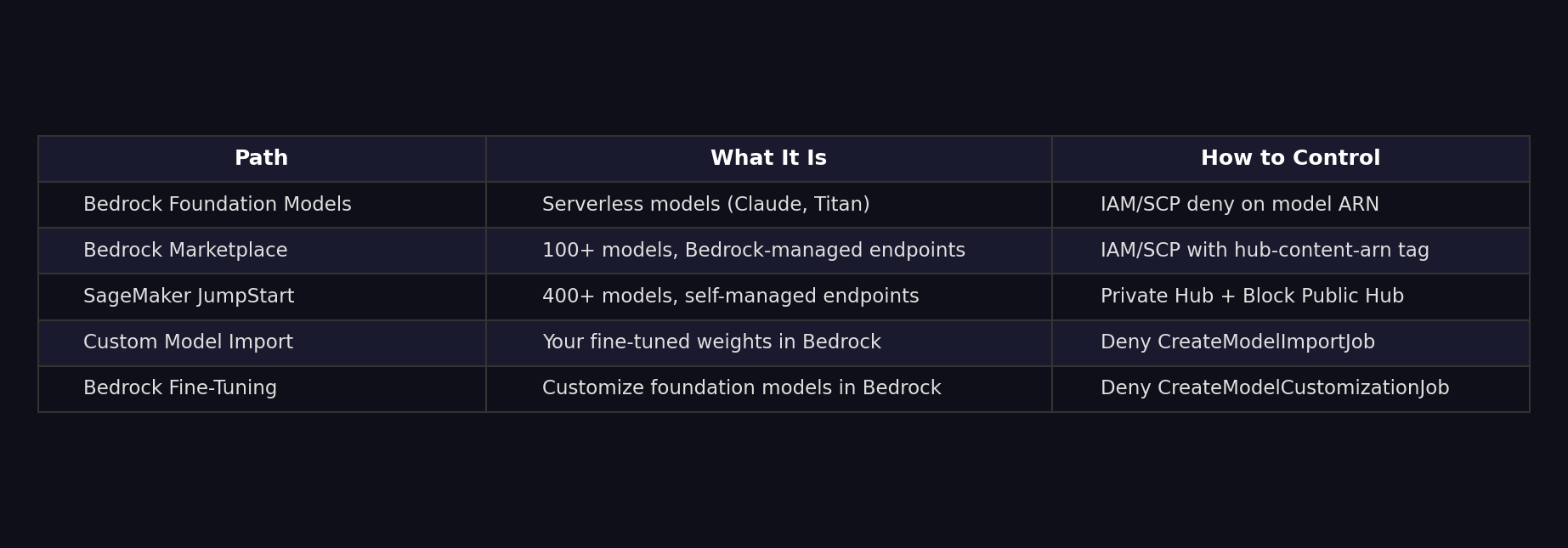
Five doors. Five locks. Once you've controlled which models can be used, the next step is controlling what they can do at runtime, and that's where Bedrock Guardrails comes in. But that's a post for another day.
References
- Deny access for inference of foundation models
- Request access to models in Amazon Bedrock
- Supported foundation models in Amazon Bedrock
- Controlling Access to Amazon Bedrock Marketplace Models
- AmazonBedrockFullAccess managed policy
- Amazon Bedrock Marketplace overview
- Implementing DeepSeek AI Model Restrictions Across Your AWS Organization
- Private Curated Hubs in SageMaker JumpStart
- Create a Private Model Hub
- Remove access to the SageMaker Public models hub
- Block gated model access in JumpStart
- Cross-account sharing for Private Hubs via AWS RAM
- Custom Model Import in Amazon Bedrock
- Customize your model in Amazon Bedrock (Fine-Tuning)
- Amazon Bedrock Guardrails