How SAML Works — Flows, SSO, and the Assertion
Part 2 of the SAML From First Principles series
What if the application never sees your password at all?
Instead of you proving your identity to every application, what if you prove it once to a trusted authority, and that authority gives you a signed letter that says "I vouch for this person"?
Think of a passport. You don't prove your citizenship to every airline counter in every country. Instead, your government (a trusted authority) issues you a passport. The airline just checks: is this passport legitimate? Was it issued by a trusted government? If yes, you're in.
The airline never verifies your citizenship directly. It trusts the government to have done that already.
This is delegated authentication. The application delegates the job of verifying your identity to someone else.
Two key players
This model introduces two roles.
The Identity Provider (IdP) is the trusted authority. It's the entity that actually verifies who you are. Think of it as the government that issues passports. In the enterprise world, this is something like Okta, Azure AD, or Ping Identity.
The Service Provider (SP) is the application. It's the entity that wants to know who you are but doesn't want to verify it directly. Think of it as the airline that checks passports. In the enterprise world, this is Slack, Jira, Salesforce, or any other application.
The IdP verifies your identity. The SP trusts the IdP's verification. The user logs in at the IdP once, and accesses the application without logging in again.
How trust is established
The airline doesn't trust just any passport. It trusts passports from specific governments. Similarly, the SP doesn't trust just any IdP. Trust must be explicitly established between the two.
This trust is established using certificates and digital signatures. The IdP has a private key that it uses to sign its assertions (the "passport"). The SP has the IdP's public key (the "certificate") that it uses to verify those signatures.
If the signature checks out, the SP knows the assertion came from the real IdP and hasn't been tampered with. If the signature doesn't check out, the SP rejects it.
No certificate exchange, no trust, no access. Both sides must explicitly configure and trust each other.
SP-Initiated Flow
This is the most common flow. You go to the application first, and it redirects you to the IdP.
The following diagram shows the complete SP-initiated flow:
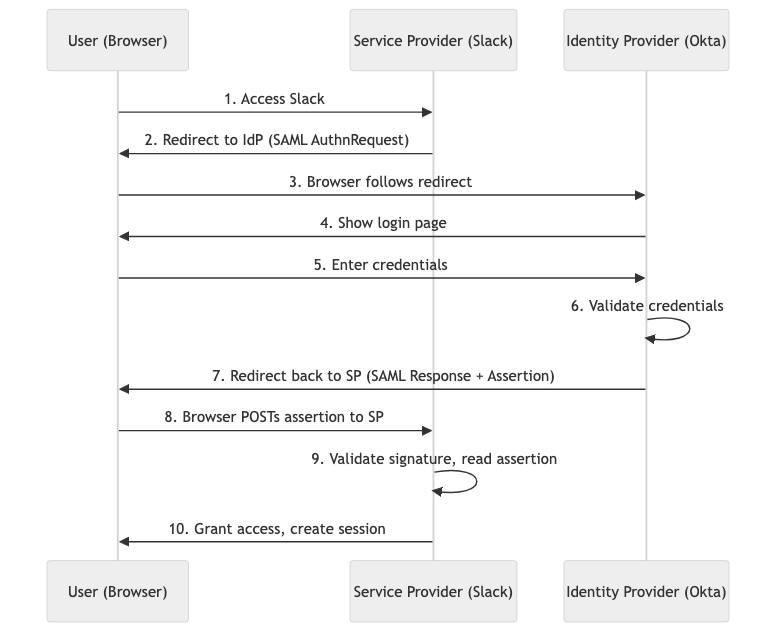
Step by step:
- You open your browser and go to slack.com.
- Slack doesn't know who you are. Slack generates a SAML AuthnRequest and redirects your browser to the IdP's SSO URL.
- Your browser follows the redirect to the IdP (e.g., login.okta.com). The AuthnRequest tells the IdP "Slack is asking you to authenticate this user."
- The IdP checks if you have an existing session cookie. If not, it shows a login page.
- You enter your credentials. The IdP validates them.
- The IdP generates a SAML Response containing a signed assertion. It sends this back to your browser as an auto-submitting HTML form that POSTs to Slack's ACS URL.
- Your browser automatically submits the form to Slack's Assertion Consumer Service endpoint.
- Slack validates the signature, reads your identity, creates a session, and grants access.
If you already authenticated at the IdP earlier, steps 4 and 5 are skipped. The IdP sees your session cookie, generates the assertion immediately, and sends it back. You never see a login page.
IdP-Initiated Flow
The other way SAML can start. Instead of going to the application first, you start at the identity provider.
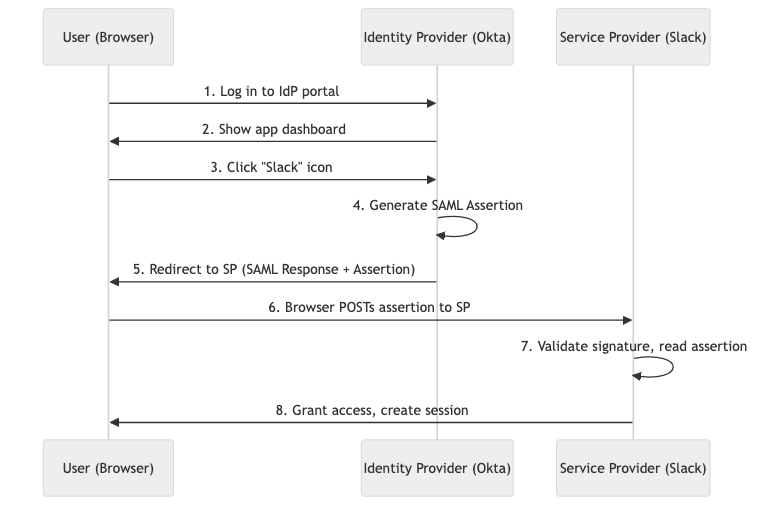
You're already logged into your Okta dashboard. You see tiles for all your applications. You click the Slack tile. The IdP generates the assertion and sends it directly to Slack. No redirect dance. No AuthnRequest from the SP.
SP-initiated is more common and more secure because the SP generates the AuthnRequest with a unique ID to prevent replay attacks. IdP-initiated is simpler but the SP receives an assertion it didn't ask for.
The SSO magic
Here's what makes single sign-on feel like magic:
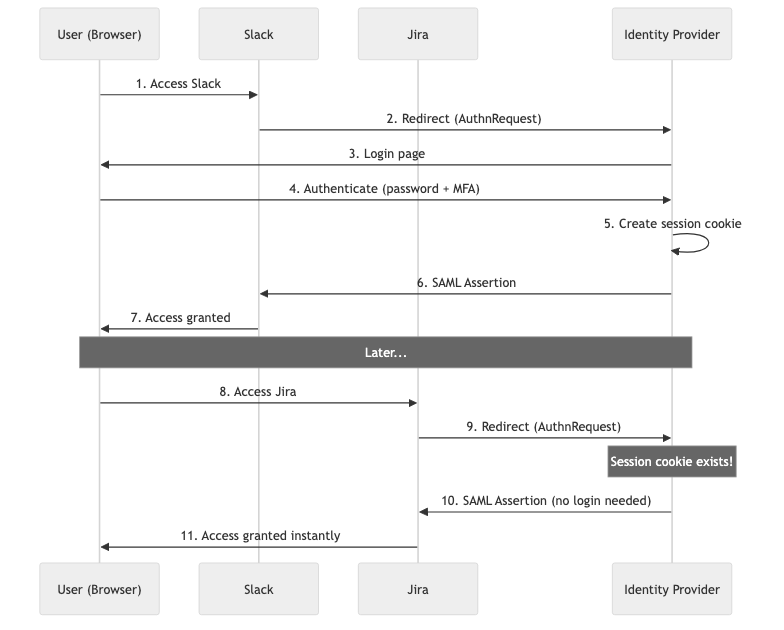
You log in to your identity provider once. The IdP creates a session cookie in your browser for its domain. Now you go to Slack. Slack redirects to the IdP. Your browser sends the session cookie automatically. The IdP sees it, skips the login page, and sends the assertion back immediately.
Open Jira. Same thing. Gmail. Salesforce. Every application. One login, and you're in everywhere.
Three things make this work:
- The browser stores cookies per domain. Every redirect to
idp.company.comincludes the cookie automatically. - The IdP checks for an existing session before showing a login page. Cookie present and valid? Skip login, generate assertion.
- Each SP creates its own session after receiving a valid assertion. Subsequent visits don't even go back to the IdP.
Inside the SAML Assertion
The assertion is the core of the protocol. It's the "passport" that carries your identity from the IdP to the SP.

An assertion contains:
- Issuer — which IdP created this assertion
- Subject (NameID) — who you are (typically your email address)
- Conditions — when this assertion is valid (NotBefore, NotOnOrAfter) and who it's for (AudienceRestriction)
- AuthnStatement — when and how you authenticated (password, MFA, etc.)
- AttributeStatement — extra info about you (role, department, groups)
- Signature — the IdP's digital signature proving it's authentic
Here's what the XML looks like (simplified):
<saml:Assertion>
  <saml:Issuer>https://idp.company.com</saml:Issuer>
  <saml:Subject>
    <saml:NameID>alice@company.com</saml:NameID>
  </saml:Subject>
  <saml:Conditions
    NotBefore="2026-03-29T10:00:00Z"
    NotOnOrAfter="2026-03-29T10:05:00Z">
    <saml:AudienceRestriction>
      <saml:Audience>https://slack.com</saml:Audience>
    </saml:AudienceRestriction>
  </saml:Conditions>
  <saml:AttributeStatement>
    <saml:Attribute Name="Role">
      <saml:AttributeValue>Admin</saml:AttributeValue>
    </saml:Attribute>
    <saml:Attribute Name="Department">
      <saml:AttributeValue>Engineering</saml:AttributeValue>
    </saml:Attribute>
    <saml:Attribute Name="Groups">
      <saml:AttributeValue>platform-team</saml:AttributeValue>
      <saml:AttributeValue>security-reviewers</saml:AttributeValue>
    </saml:Attribute>
  </saml:AttributeStatement>
  <ds:Signature>...</ds:Signature>
</saml:Assertion>
The SP validates the signature, checks the time window, verifies the audience matches itself, reads the NameID to identify the user, and reads attributes to determine permissions.
Signing vs Encrypting
Signing proves the assertion is authentic and unmodified. The IdP signs with its private key. The SP verifies with the IdP's public key. Always required.
Encryption adds confidentiality. The assertion travels through the user's browser. If someone intercepts it, they can read it (signing doesn't hide content). Encryption uses the SP's public key so only the SP can decrypt it.
Most deployments use signing only, relying on TLS for confidentiality. High-security environments add assertion encryption as defense in depth.
Previous: The Problem SAML Solves
← Back to all posts